



1
of
14
Loading...
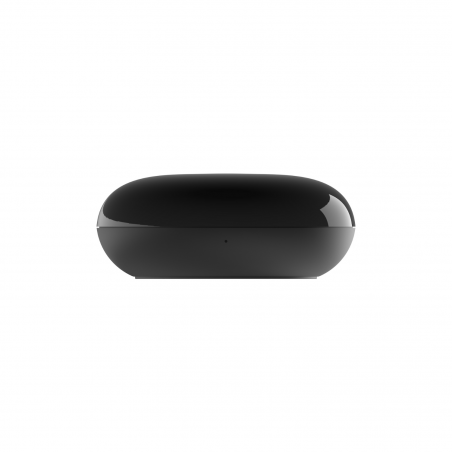
LinknLink eRemote HA – IR Blaster with MQTT for Home Assistant
Regular price
317,00 kr
Unit price
Pickup available at Dynamodz
Usually ready in 2-4 days
Shipping information
Shipping information
Orders placed on weekdays before 4:00 PM and in stock will be shipped the same day . In most cases, your order will be delivered the next day. More details can be found in our shipping policy .

LinknLink eRemote HA – IR Blaster with MQTT for Home Assistant
Regular price
317,00 kr
Unit price

Regular price
317,00 kr
Unit price
Description
Description
LinknLink eRemote HA – IR Blaster with MQTT for Home Assistant
Many devices in your home, such as the TV, air conditioner, or set-top box, can only be controlled with a physical remote control. The LinknLink eRemote HA changes that: it translates infrared signals into MQTT messages, making these devices fully controllable from Home Assistant. No extra hub, no complex configuration, no cloud required for local operation.
Power and connectivity
The eRemote HA operates on 5V via USB and connects exclusively via 2.4 GHz Wi-Fi. A 5 GHz network is not supported. The infrared range is a maximum of 12 meters; in many rooms, signals also reach further through reflections on walls. The eRemote and your Home Assistant instance must be on the same local network (LAN).
Functionality and settings
You add IR devices via the LinknLink app by selecting the brand and model from the extensive cloud library, or by manually teaching IR codes from your physical remote control. For each device type (e.g., TV, air conditioner, DVD player), one IR panel can be created due to the limited storage capacity of the device. Once a device is added and MQTT is configured, all buttons automatically appear as entities in Home Assistant.
Supported devices
The eRemote HA works with all 38 kHz infrared devices, including TVs, air conditioners, set-top boxes, DVD players, amplifiers, and projectors. Brands without a match in the cloud library can be manually taught via IR Learning. Also check out our smart switches and wireless switches to expand your smart home.
Home Assistant
The eRemote HA connects to Home Assistant via the MQTT integration. No official HA integration or HACS component is required; the connection is made entirely via the MQTT protocol. Local control is confirmed once MQTT is configured; the cloud connection is no longer needed for automations thereafter.
Step-by-step connection procedure
- Power on the eRemote via a 5V USB adapter; the LED light will flash blue in startup mode.
- Open the LinknLink app, enable Bluetooth on your phone, and add the eRemote via + > Add Device > eSeries Hubs & Sensors > eRemote.
- Select your 2.4 GHz Wi-Fi network and enter the password; the LED light will flash slowly and then turn off upon successful connection.
- Add an IR device via + in the app: choose the device type, select "Add for HA," search for your brand, and follow the wizard. If your brand doesn't work? Use IR Learning to manually teach codes.
- Go to the eRemote device page in the app, click on "..." > MQTT Connection and enter your MQTT server details (host, port, username, password).
- Check that the status shows "Connected" and then go to Settings > Devices & Services in HA; the IR devices will appear automatically.
Entities after pairing: for each IR device, a series of buttons (button entities) corresponding to the learned or downloaded remote control buttons, e.g., on/off, volume change, channel change, temperature setting (for air conditioning).
Homey
The eRemote HA is compatible with both Homey Cloud and Homey Pro via the official LinknLink app for Homey. Add the app via the Homey app store, log in with your LinknLink account, and your IR devices will appear automatically. Limitations compared to the MQTT connection in HA: you are dependent on the LinknLink cloud for the connection with Homey; fully local operation is not guaranteed.
Other platforms
The eRemote HA is compatible with Alexa and Google Home via the LinknLink app. Connect your voice assistant via + > Add Voice Assistant in the app and link your account. Apple Home is not directly supported. Anyone who still wants to integrate the eRemote HA into Apple Home can do so via Home Assistant in combination with Homebridge.
Automation examples
Example 1 – Automatically turn off TV when in sleep mode
- Trigger: input_boolean.sleep_mode is enabled at 23:00.
- Condition: media_player.living_room_tv is not off.
- Action: call button.eremote_tv_power to turn off the TV via IR.
Example 2 – Turn on air conditioning based on temperature and presence
- Trigger: sensor.living_room_temperature rises above 26°C.
- Condition: binary_sensor.presence_living_room is home AND time is between 12:00 and 22:00.
- Action: call button.eremote_ac_on and set the desired mode and temperature via a series of IR buttons.
- Trigger 2: temperature drops below 23°C, AC turns off.
Points of attention
- Works exclusively on 2.4 GHz Wi-Fi; 5 GHz is not supported.
- Only one IR panel can be created per device type (TV, AC, etc.) due to limited storage capacity.
- Adding an air conditioner profile via the cloud library can take up to 50 seconds.
- The eRemote and Home Assistant must be on the same local network.
- An active MQTT broker in HA is required (e.g., Mosquitto add-on).
- No RF support; infrared only (38 kHz).
Box contents
- 1x LinknLink eRemote HA
- 1x USB cable
Compatibility
Compatible with Home Assistant (via MQTT), Alexa, and Google Home. Works with all 38 kHz infrared devices: TVs, air conditioners, set-top boxes, DVD players, amplifiers, and projectors. View all LinknLink products in our webshop.
Specifications
| Connectivity | Wi-Fi 2.4 GHz (802.11 b/g/n) |
| IR range | Up to 12 meters |
| IR frequency | 38 kHz |
| Power supply | 5V via USB |
| Home Assistant Integration | Via MQTT (IR2MQTT) |
| App | LinknLink (iOS and Android) |
| Compatible platforms | Home Assistant, Alexa, Google Home |
| RF support | No, infrared only |
| Country of origin | China |
Frequently Asked Questions
Do I need an MQTT broker in Home Assistant?
Yes, an active MQTT broker is required. Use the Mosquitto add-on in Home Assistant (Settings > Add-ons > Mosquitto broker). Once the eRemote is connected to your MQTT broker via the LinknLink app, the IR devices will automatically appear as entities in HA.
Does the eRemote HA also work without internet?
Local MQTT control works completely without internet. The initial setup and downloading of IR profiles from the cloud library require an internet connection. After configuration, all MQTT automations are local.
Can I control any brand of TV or air conditioner?
The app contains an extensive cloud library with many brands. If your brand is not listed, you can manually teach the IR codes using the IR Learning function in the app. Almost any device with a 38 kHz infrared remote control can be controlled with this.
How many devices can I add?
Only one IR panel can be created per device type (e.g., TV, air conditioner) due to the limited storage capacity of the eRemote. So you can use one TV panel and one air conditioner panel at a time. Multiple instances of the same type require an additional eRemote HA.
Does the eRemote HA also work on 5 GHz Wi-Fi?
No, the eRemote HA only supports 2.4 GHz Wi-Fi. Make sure your router or access point broadcasts a separate 2.4 GHz network and connect the eRemote to it. Modern routers with band steering switch automatically; temporarily disable this during setup if necessary.
Is there a Homey integration available?
Yes, LinknLink has an official app for Homey available via the Homey Appstore. Works with both Homey Cloud and Homey Pro. The connection is made via the LinknLink cloud; fully local operation, as with the MQTT integration in HA, does not apply.
✅ slimhuisje.nl — Immediately available and ready to use with your existing MQTT broker. Take the first step towards a fully local smart home without separate remote controls.
EAN:
Payment convenience: pay the way you want
E
Werkt vrij goed met homeassistant. Loop wel tegen een issue aan waarbij een verwijderd apparaat in de app blijft terugkeren in HA
Hallo Enno, bedankt voor je positieve feedback! Goed om te horen dat de LinknLink eRemote vrij goed werkt met Home Assistant. Mocht je nog vragen of problemen ondervinden, we staan altijd klaar om te helpen. Voor snelle support kun je ook de WhatsApp-knop rechtsboven op slimhuisje.nl gebruiken.







